Technical safety knowledge locked in dense documentation. Designing the GenAI interface that made it accessible to every internal team — without the expertise barrier.
A GenAI system built to give internal teams instant access to dense technical knowledge — in plain English, without the expertise barrier. Engineering had built a full, functional product — the AI capability was real and working. UX came in as a proof of concept: the client wanted to see what a structured, user-centered approach could add. I led that UX direction — and made the case for what good looks like.
Technical safety knowledge locked in dense documentation. Designing the GenAI interface that made it accessible to every internal team — without the expertise barrier.
A GenAI system built to give internal teams instant access to dense technical knowledge — in plain English, without the expertise barrier. Engineering had built a full, functional product — the AI capability was real and working. UX came in as a proof of concept: the client wanted to see what a structured, user-centered approach could add. I led that UX direction — and made the case for what good looks like.
The original implementation demonstrated genuine AI capability — the engineering team had built a full, functional product. But working technology and usable technology are not the same thing. UX was brought in as a proof of concept: the client wanted to see whether a structured, user-centered approach could make the product meaningfully better. The answer was yes — but first, the gaps had to be named.
The gap between technical demonstration and enterprise usability was significant. Leadership and users alike could see the AI doing something interesting — but couldn't visualise how it would fit into real operational workflows, or trust what it was producing.
As a result, a technically complete product was stalling at the adoption layer. The engineering work was done. What it needed was a user experience that made it feel real — and usable — to the people who would rely on it every day.
I led the UX direction for the initiative, working closely with engineering teams and stakeholders to redefine how enterprise users interact with AI-driven knowledge systems. This was not primarily a visual design engagement — it was a strategic and structural one.
The engagement required balancing what the AI could technically deliver against what enterprise users would actually need — and finding the design layer that connected both.
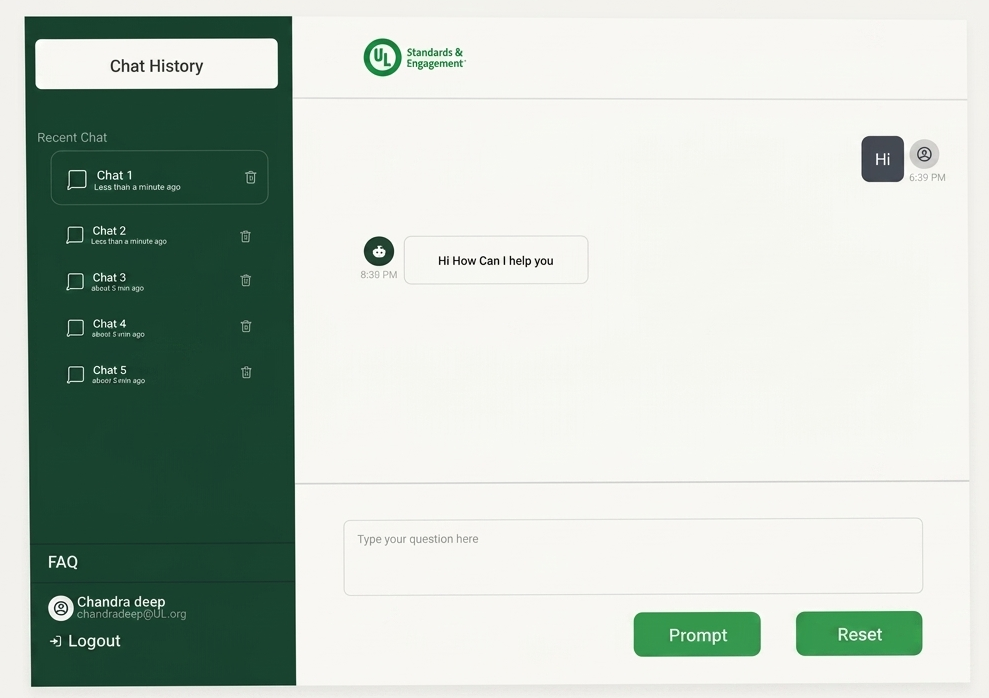
The engineering PoC already returned plain English — language wasn't the problem. The problem was shape: every query received the same response structure, regardless of what the user was actually trying to do. Diagnosing that gap started with a direct question to stakeholders: what would you actually query this system for?
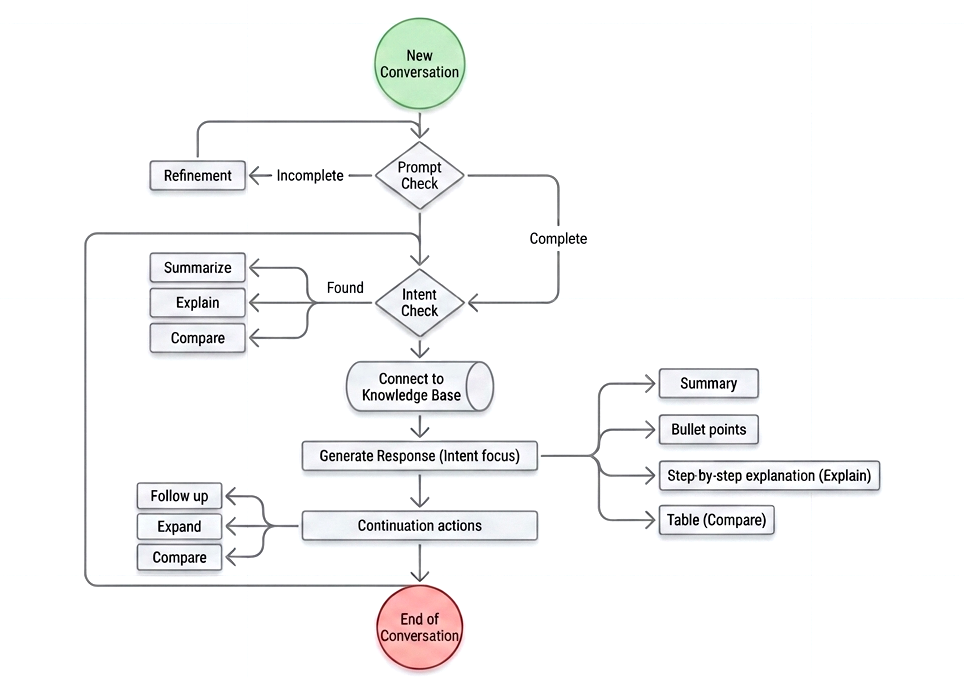
Sixteen prompts came back. Reading across them, four distinct intent types emerged — each requiring a fundamentally different shape of answer. The second input was GenAI design guidelines: established output patterns for different information types. Mapping the two together produced the design foundation for how the system should respond.
One prompt in the stakeholder list read: "Give me a table to compare: UL 3115 and UL 4600." Users were already signalling the output format they wanted — they just had no system that responded to that signal. Mapping intents to patterns gave the design direction its foundation: the system needed to read intent, not just process text.
The core reframe was conceptual before it was visual. The original system treated AI as a generic chat interface — you type something, it responds. That model works for consumer applications where the cost of a wrong answer is low. In enterprise environments, it creates friction, uncertainty, and distrust.
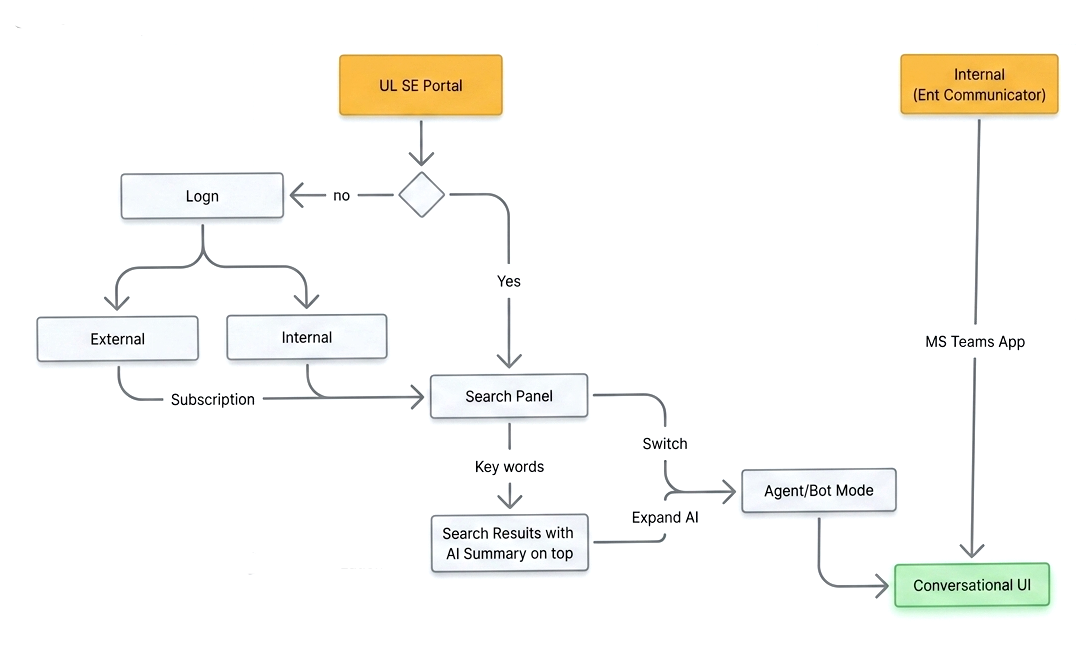
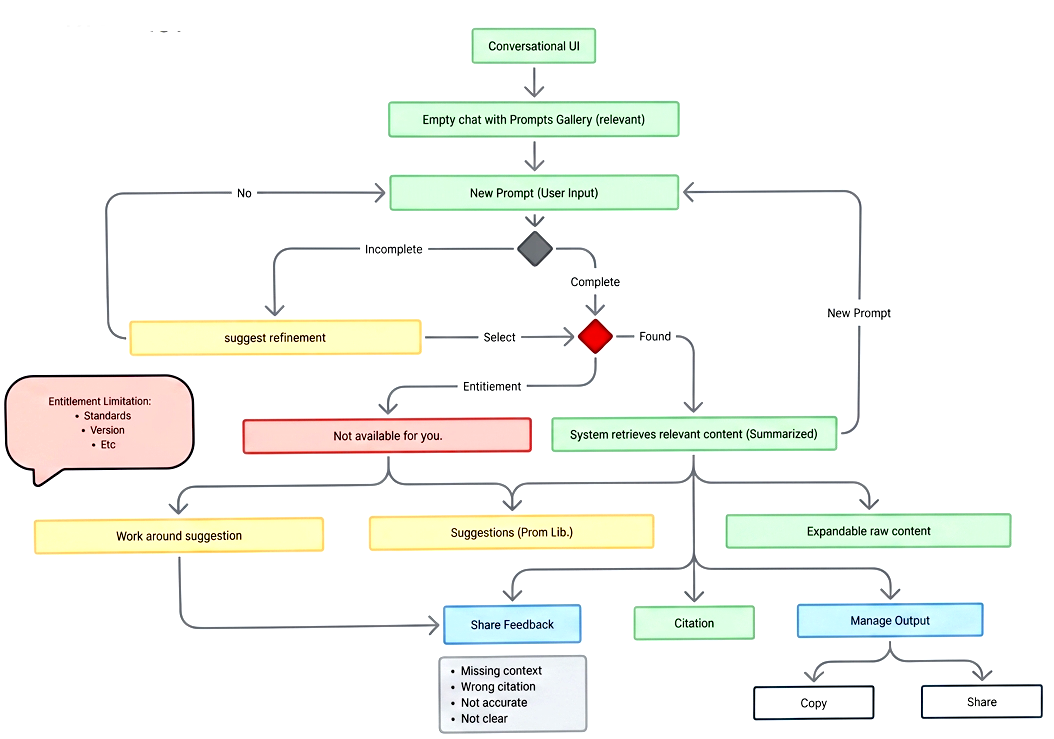
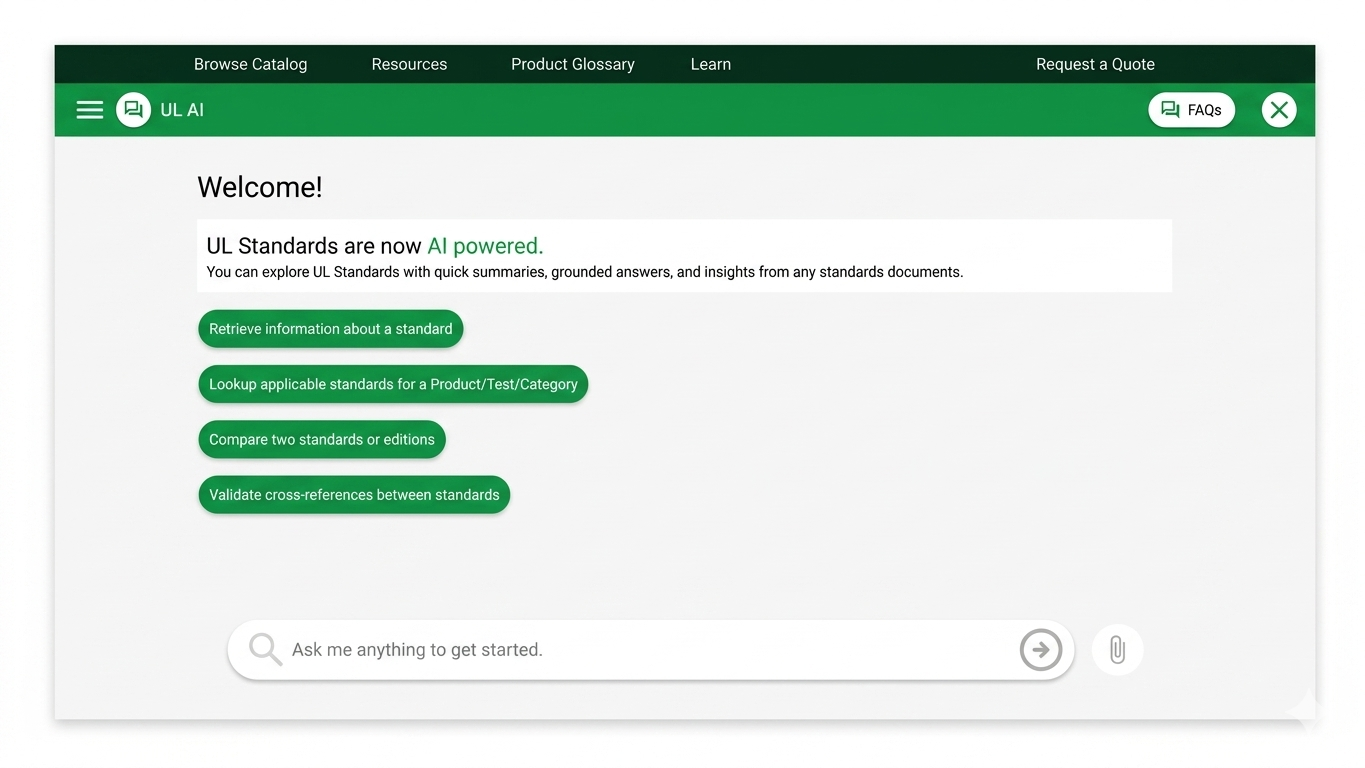
Instead, I introduced more structured interaction patterns designed for enterprise usage: progressive navigation through complex information, guided discovery of what the system knows and how to reach it, and output formats that communicate certainty alongside content.
"The goal was not to make AI feel smarter. It was to make AI feel understandable — so enterprise users could form a working mental model of what the system does, trust the outputs it provides, and know when and how to act on them."
Each move addressed a specific gap between what the PoC demonstrated and what internal teams would need to actually use it — not just aesthetically, but structurally. The goal was to build the interaction layer that made the AI's technical capability reachable.
The before/after is not about visual redesign. It's about the interaction contract between the system and its users — what the system communicates, how it communicates it, and what users are expected to do with it.
The engagement moved the initiative from a technically-led demonstration to a product direction leadership could evaluate and act on. The design was presented to stakeholders — the interaction layer made the AI's capability concrete enough to discuss, validate, and plan around. It moved to the product roadmap. The outcome wasn't a shipped product; it was a credible product direction where none had existed before.
The shift that mattered most wasn't in the interface — it was in how leadership understood the system's potential. When users could navigate it, trust what it returned, and act on what it produced, the conversation changed from "interesting technology" to "this is something we can build on." That's what structured UX direction delivered.
"Successful enterprise AI products need more than technical capability. They need interaction clarity, trust, guidance, and alignment with real operational behaviour. The goal wasn't to design another AI chat experience — it was to make AI feel understandable, usable, and trustworthy within enterprise environments."
One of the most rewarding aspects of this initiative was demonstrating how UX can shape enterprise AI beyond interface design. The biggest shifts happened not in how the system looked, but in how it communicated — what it surfaced, when, and in what form.
In enterprise AI, the interaction layer is not decorative — it is the product. An AI system that users cannot navigate, trust, or integrate into real workflows will not be adopted, regardless of how capable the underlying model is. That belief shaped every decision in this engagement.